The File Upload Option in the Sellio Product Options app allows customers to upload files directly on the product page. This is ideal for products that require custom designs, images, documents, or references from customers.
It provides a simple way for merchants to collect user-provided files for personalization or processing.
A File Upload Option enables customers to upload a file (such as an image, PDF, or document) while placing an order.
Example:
Upload Your Design
? Customer uploads:
Logo file
Image for printing
Reference document
Basic Configuration
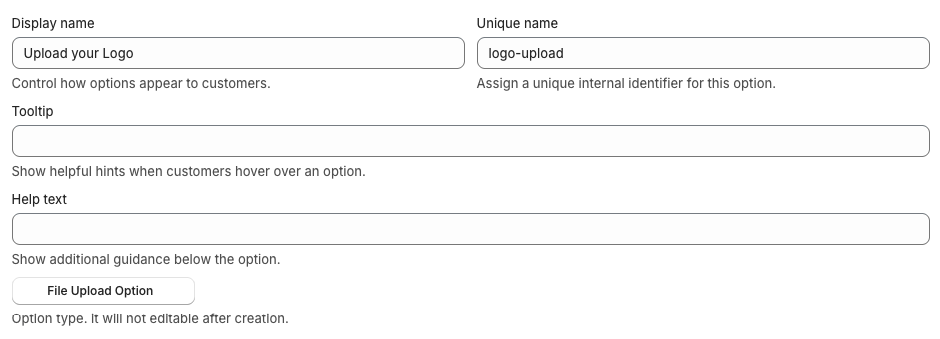
• Display Name
This is the label visible on the product page.
Example: Upload Your Design
• Unique Name
Internal identifier used for backend operations.
Example: file_upload
• Tooltip
Displays additional information when hovered.
Example: Upload your file for customization
• Help Text
Shown below the option to guide customers.
Example: Upload a high-quality file for best results
Advanced Settings
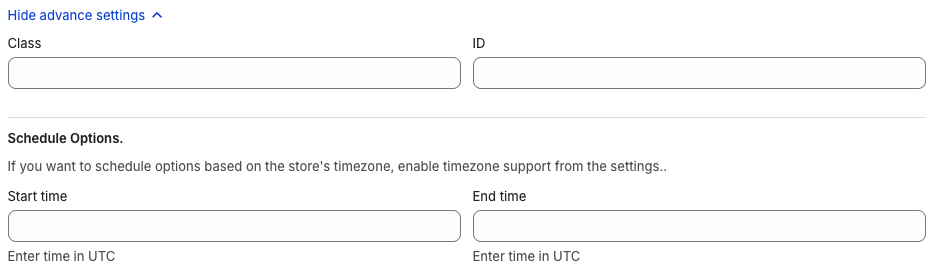
• Class & ID
Used for custom styling or tracking via CSS/JS.
• Schedule Option
Control when the option is visible:
Start Time
End Time
Use Case:
Enable file uploads only for specific products or campaigns.
Upload Behavior
Customers can upload files directly from their device
Common supported formats include:
Images (JPG, PNG)
Documents (PDF, DOC)
? Uploaded files are attached to the order for merchant access.
⚠️ Important Notes
Maximum file size allowed: 20 MB
There are no option values in this option type
It is purely used for file input
No pricing is applied directly (unless handled separately)
? Use Cases
Custom printing (T-shirts, mugs, banners)
Logo uploads for branding
Artwork submissions
Document submission for services
Personalized gifts
? Pro Tips
Clearly mention file format and size guidelines in help text
Encourage users to upload high-resolution files
Use descriptive labels like Upload Logo or Upload Artwork
Combine with other options (like text or font selector) for full customization
Test upload functionality on mobile devices
? Example Setup
Option Name: Upload Your Design
Help Text: Upload high-quality image (JPG/PNG recommended)
✅ Conclusion
The File Upload Option is a simple yet essential feature for collecting customer files directly on the product page. It streamlines the customization process by allowing customers to submit their designs or documents during purchase.
By using this option effectively, merchants can simplify workflows, reduce back-and-forth communication, and enhance personalization capabilities.
If you want next, I can:
? Create a final master guide combining all options
? Or build a Help Center style documentation structure ?
Was this article helpful?
That’s Great!
Thank you for your feedback
Sorry! We couldn't be helpful
Thank you for your feedback
Feedback sent
We appreciate your effort and will try to fix the article